
eBay color variations: Group colors
Combine a part's separate per-color eBay listings into one listing with a color dropdown, opt-in per item, with per-color prices kept under one shared title.
By default, eBay carries a separate listing for every color of a part. Color variations let you fold those into one listing with a color dropdown, so a buyer picks the color they want on a single page instead of you maintaining a dozen near-identical listings. It’s opt-in per item and never automatic.
Find it on the eBay screen under the Group colors tab.
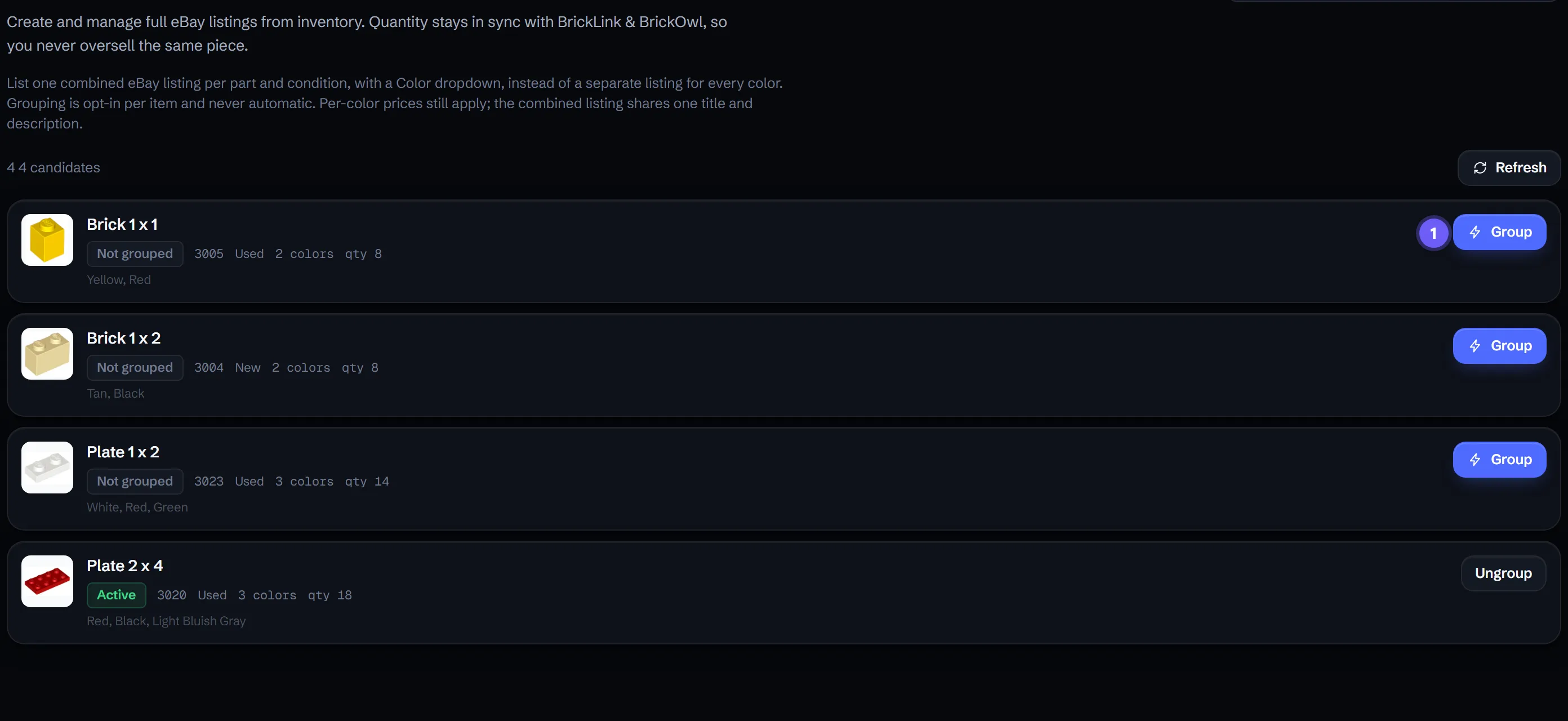
The Group colors tab. 1 marks the Group button that folds a part’s separate per-color listings into one.
What grouping does
- One listing per part and condition, with a Color dropdown in place of a separate listing for each color.
- One shared title and description for the combined listing. Per-color titles no longer apply.
- Per-color prices still apply, so each color keeps its own price inside the one listing.
Group a part
- Open the Group colors tab on the eBay screen.
- Find a candidate part (one sold on eBay in two or more colors) and choose Group.
- Confirm the change. BrickPulse spells out what happens: your current individual color listings will end and be replaced by one combined listing.
- The combined listing is created on the next eBay sync. Until then the row shows it’s queued to be grouped.
Before you group: what doesn’t carry over
Grouping is a relist, not an edit. When the old per-color listings end and the combined listing is created:
- Watchers do not carry over. Anyone watching an old single-color listing won’t be watching the new one.
- Sales history does not carry over to the new listing.
So group when a cleaner, single listing is worth more to you than the watchers and history you’d reset. High-watcher listings may be worth leaving as they are.
Ungroup
If you change your mind, Ungroup splits the combined listing back into per-color listings. Because that’s also a relist, watchers and history don’t come back when you ungroup either. If a grouping attempt errors, it’s parked with a Try again action rather than retried silently.
Good to know
- A part only becomes a candidate once it sells on eBay in two or more colors. Enable more colors for eBay in Inventory to grow the candidate list.
- Grouping and ungrouping both take effect on the next eBay sync, not instantly.
Do watchers and sales history carry over?
No. Grouping ends your current per-color listings and creates a new combined one, so watchers and the old listings' sales history do not carry over. Group when the simpler listing is worth more to you than the watchers you'd reset.
Can I still charge different prices per color?
Yes. A combined listing has one shared title and description, but per-color prices still apply, so each color in the dropdown keeps its own price. Only per-color titles stop applying.
Why doesn't a part show up to group?
A part only becomes a candidate once it's sold on eBay in two or more colors. Enable the extra colors for eBay in Inventory first, then it appears under Group colors.
Is grouping permanent?
No. You can Ungroup a combined listing later, but ungrouping is itself a relist, so watchers and history don't carry back either.