
eBay listing templates
Set reusable title and description templates with tags like {name}, {color}, and {condition}, so every eBay listing is written consistently without editing them one by one.
Listing templates let you write your eBay title and description once, with tags that fill in each item’s details, so every listing reads consistently without you editing them one at a time. Find them in Settings, under eBay listing templates (the section appears once eBay is connected).
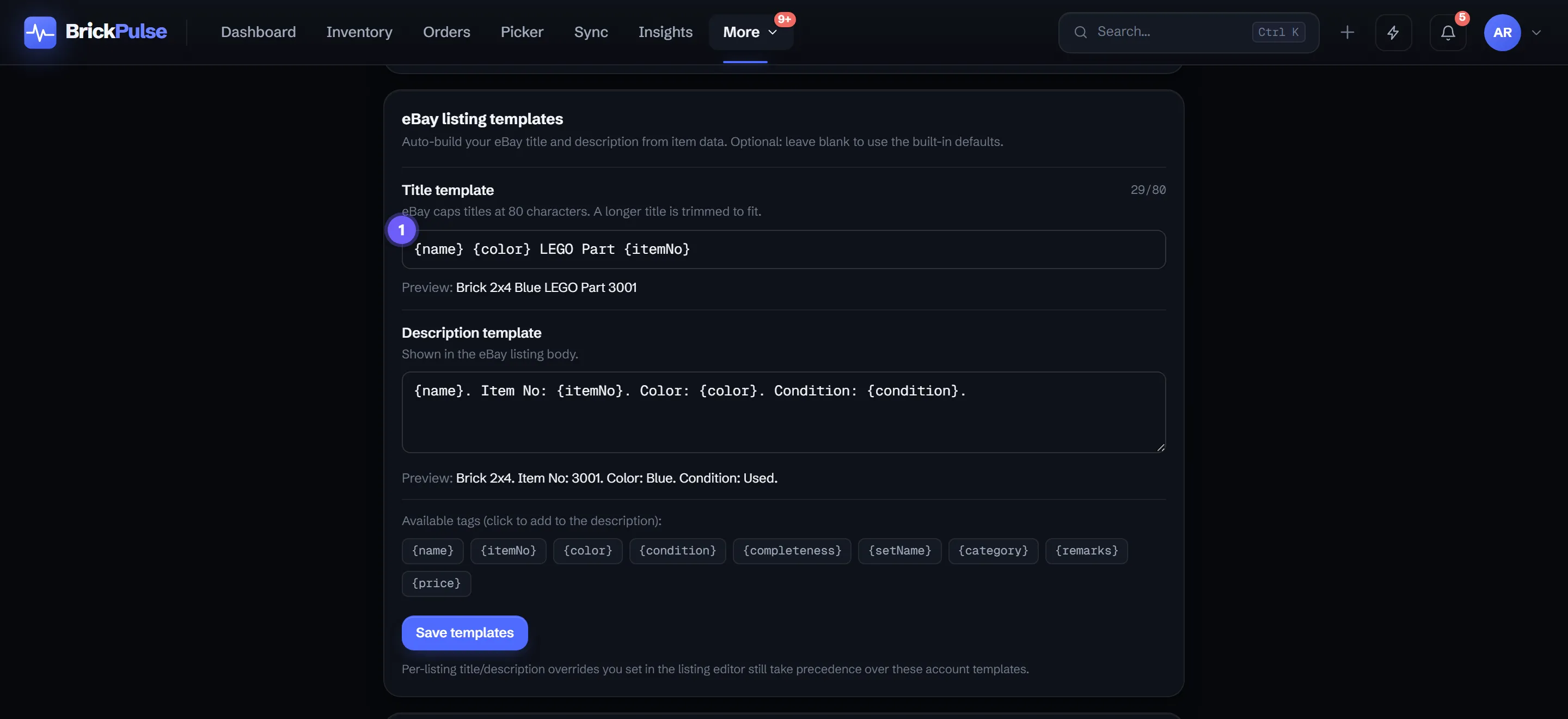
1 marks the title template. The Preview line under each field shows a sample listing built from your tags.
Write a template
There are two templates:
- Title template - for example
{name} {color} LEGO Part {itemNo}. - Description template - for example
{name}. Item No: {itemNo}. Color: {color}. Condition: {condition}.
Type your own wording around the tags, and each tag is replaced with that item’s value when the listing is built.
Tags you can use
Drop any of these into either template:
{name}- the item’s catalog name.{itemNo}- its catalog number.{color}- the color name.{condition}- new or used.{completeness}- for sets and minifigs.{setName}- the set a part belongs to, where relevant.{category}- the catalog category.{remarks}- your public comment on the lot.{price}- the eBay price.
A tag with no value for a given item is left out and the spacing closes up, so you never get stray gaps or empty labels.
The 80-character title cap
eBay caps listing titles at 80 characters. If a rendered title runs longer, BrickPulse trims it to fit. Put the tags that matter most (like {name} and {color}) near the front so the important words survive the trim.
Per-listing edits still win
Templates set the default for every listing, but a title or description you edit on an individual listing takes precedence. So you can template the whole store and still hand-tune the few listings that need special wording, without your edits being overwritten. If you leave a template blank, BrickPulse uses a built-in default rather than publishing anything empty.
What tags can I use?
{name}, {itemNo}, {color}, {condition}, {completeness}, {setName}, {category}, {remarks}, and {price}. Any tag with no value for an item is simply left out, and the spacing tidies up.
What if my title runs long?
eBay caps titles at 80 characters, so BrickPulse trims a longer title to fit. Put the most important tags first so nothing important is cut.
Do my hand-edited listings get overwritten?
No. A title or description you set on an individual listing takes precedence over the account template, so per-listing edits always win.
What if I leave a template blank?
BrickPulse falls back to a sensible built-in default, so a listing is never published with an empty title or description.